
Rule-based routing on a line
A line used to have exactly one exit: direct, or one upstream. Sending streaming to another exit or blocking ads meant opening more lines or asking users to configure rules in their clients. Since 0.6.14 you tick Rule-based routing on the line instead.
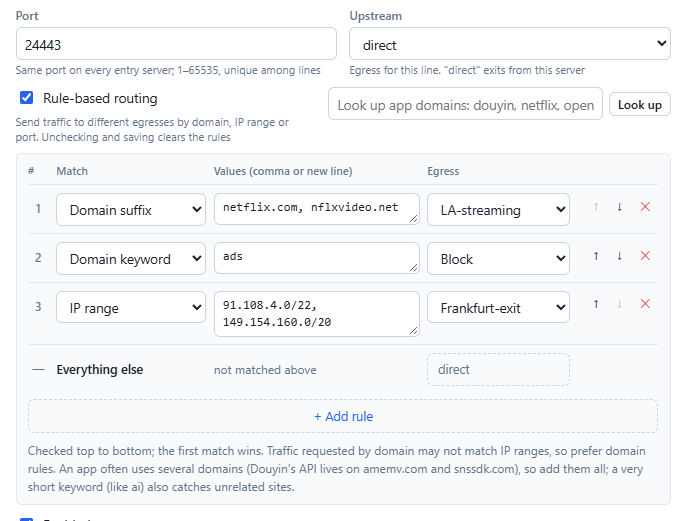
How it works
Edit or add a line and tick Rule-based routing under Upstream. Each rule has three parts:
- Match: domain suffix, full domain, domain keyword, IP range, or port.
- Values: as many as you like, separated by commas or new lines.
- Egress: any upstream, direct, or block.
Rules are checked top to bottom and the first match wins; anything unmatched uses the line's own upstream — the "Everything else" row at the bottom shows which one and follows the upstream dropdown. Invalid values are flagged in red with the reason as you type, and every save is still dry-run through sing-box. Leave it unticked and nothing changes.
Looking up an app's domains
Apps rarely use a single domain, and hunting them down by hand is tedious. With Rule-based routing ticked there is a lookup box on the same row: type app names (douyin, netflix, chatgpt, google…, comma-separated) and click Look up. The panel's server looks them up in the public v2fly/domain-list-community list (where the clients' geosite rules come from) and adds one rule per app, labelled with the app name; edit the domains and pick the egress before saving. Names that are not found stay in the box with similar names offered; click one to swap it in and look up again.
WeChat, Alipay, Gmail and the like have no list of their own; their domains are picked out of the big Tencent, Alibaba and Google lists, which the result notes, and may be incomplete, so add more if needed. Some apps such as WeChat also open connections straight to IP addresses without a domain, which domain rules cannot catch; covering those takes IP range rules.
Five match types
| Match | Example | Notes |
|---|---|---|
| Domain suffix | netflix.com | The domain itself and all its subdomains (www.netflix.com), not notnetflix.com. |
| Full domain | www.example.com | Exactly that name. |
| Domain keyword | ads | Any domain containing those letters. A very short keyword (like ai) also catches unrelated sites. |
| IP range | 91.108.4.0/22, 1.2.3.4 | A single IP becomes /32. This matches the destination address: traffic requested by domain may not match an IP range, so prefer domain rules where you can. |
| Port | 25, 8000-9000 | A single port or a range. |
Typical uses
- Streaming through another exit: the line goes direct, while
netflix.comandnflxvideo.netuse a US upstream. - Blocking what you don't want to carry: by keyword or by port, for example outbound mail on port 25.
- All of an app's domains: apps rarely use just one. Douyin serves video from
douyinvod.combut its API lives onamemv.comandsnssdk.com, so adouyinkeyword only catches part of it; add them all. - Special-casing a network: on a line that exits through WARP, send one service's IP range direct.
Private-network blocking
Unless you allow it in settings, m-ui blocks users from reaching the server itself, private networks and cloud metadata addresses through the proxy. Routing rules don't open a hole in that: for traffic that ends up going direct, domains are still resolved on the server first and private results are still blocked; traffic sent to an upstream is not resolved locally (the network on the far side is the upstream's business). Destinations written as private IPs are blocked whichever exit they would take.
Multiple servers
Routing rules are part of the line, so they travel with it to every node it is deployed on, and each node renders them the same way. Older nodes don't know the field, so once you use routing rules, nodes must run 0.6.14 or later: an older node rejects the configuration and the Servers page asks you to upgrade it, instead of silently dropping the rules and letting blocked traffic out through the default exit. If you don't use the feature, nothing changes.
An upstream that a routing rule points at counts as in use, so it can't be deleted, and health checks cover it too.
Editing from a phone
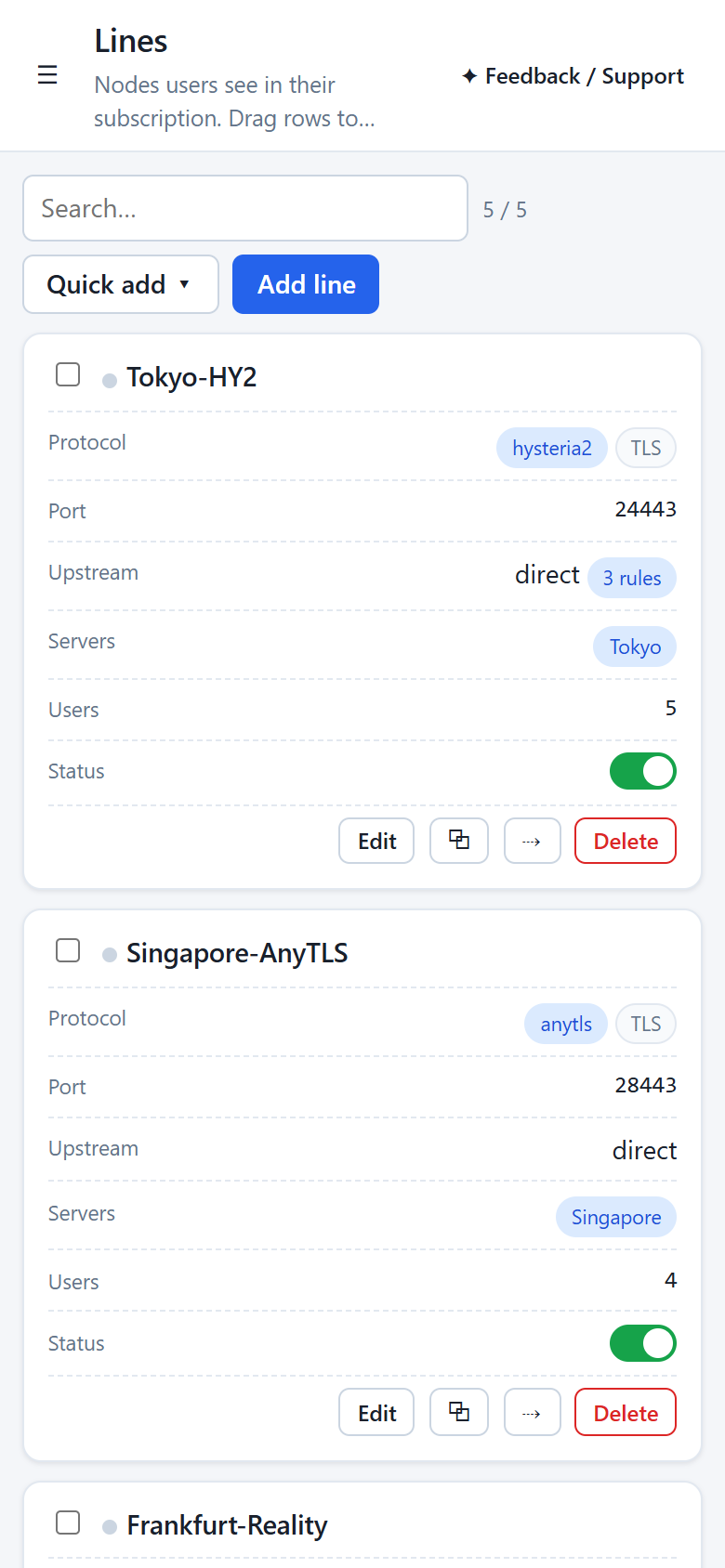
At phone width the panel lays lists out as cards, one field per row; lines with routing rules show "N rules", and the rule editor stacks its fields vertically.
Deliberately left out
- Per-user rules: rules belong to the line, so everyone on a line gets the same routing.
- GeoIP and rule sets: large lists that need constant updates belong in the client; the line keeps to these five simple matches so every server renders the same thing.