
A sing-box panel that manages the core, not just its JSON
sing-box is a superb proxy core and a poor multi-user product: one JSON file, one process, no idea who is over quota. A sing-box panel turns it into a service. m-ui is one — written by Maoyangui, GPL-3.0, one Go binary with the core embedded.
Why you need a panel at all
Running sing-box for yourself is a config file and a systemd unit. Running it for other people adds everything the core does not do: issuing credentials per person, counting their traffic, cutting them off at a quota or an expiry date, limiting devices, handing out a subscription their client can import, keeping certificates fresh, and doing all of that on more than one server without editing five files. That is the job of a sing-box panel. Most panels solve it by wrapping the JSON in forms and restarting an external process. m-ui solves it differently.
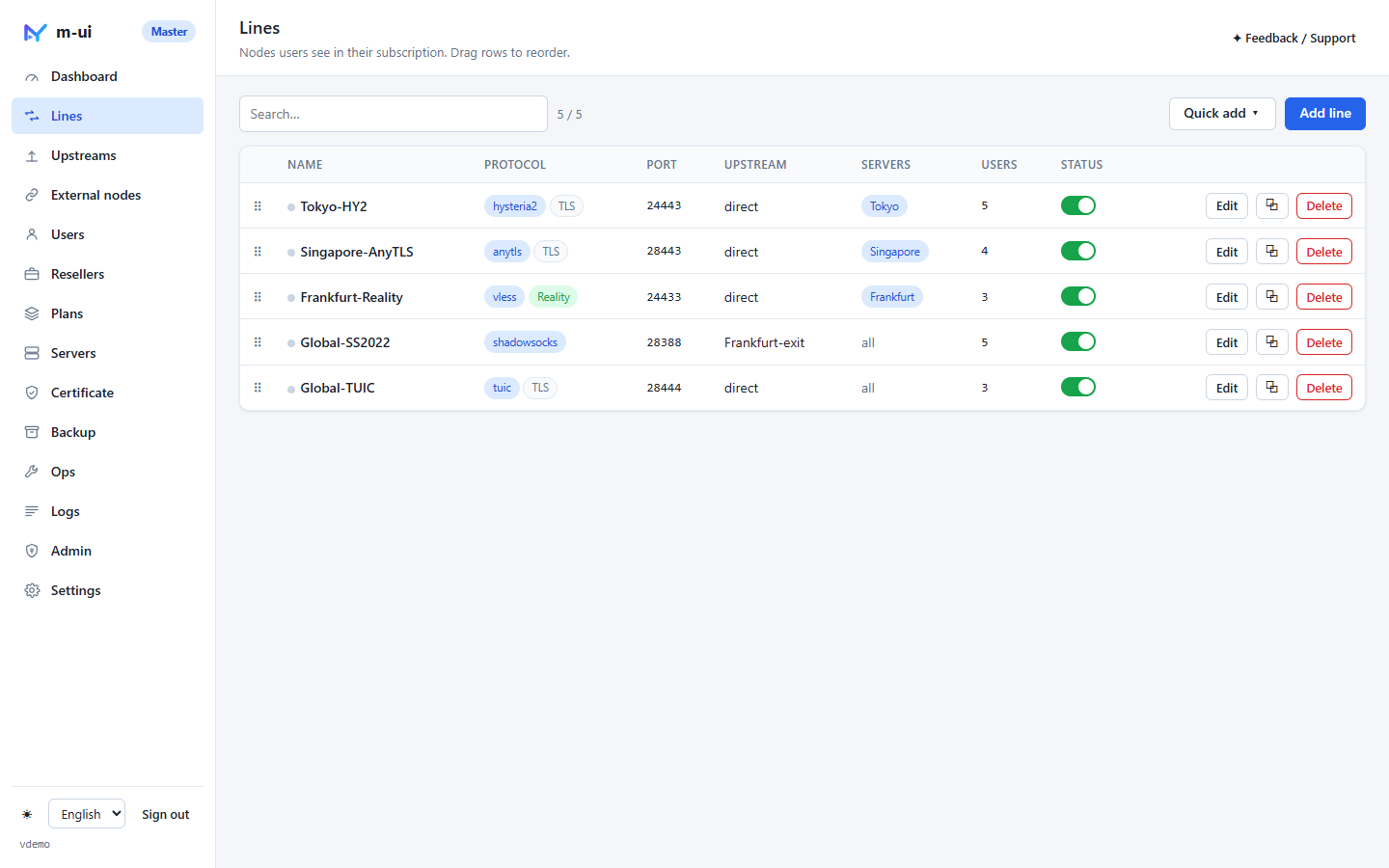
Lines instead of inbound / outbound / routing tables
In m-ui the unit you manage is a line: inbound protocol + port → where traffic exits. Hysteria2, AnyTLS, TUIC, VLESS with Reality, Trojan, VMess and Shadowsocks 2022 are all lines; the exit is direct or one of your upstreams (another proxy, or Cloudflare WARP). The panel renders lines into a complete sing-box configuration — inbounds, outbounds and the routing rules that connect them — for every server the line is deployed to. You never keep three tables consistent by hand, and a line deployed to three servers is one record, not three.
Quick-add presets pick sensible defaults and a free port; saves are rejected if the port collides with another line, the panel or any other process on the box, and every save is parsed by sing-box itself before it is committed.
Users: credentials, quota, expiry, devices, speed
A user is created once and gets credentials for every protocol automatically. Assign the lines they may use, set a quota, an expiry date, an optional periodic reset, a device limit and upload / download speed limits. Enforcement runs every minute: over quota or expired means disabled and kicked, on every server. Plans make this a one-click template; resellers get their own panel and budget. Details on user management.
Subscriptions your users can actually import
Each user has one subscription address that answers in three formats: universal links for Shadowrocket, nextin, Surge and friends; Clash / Mihomo YAML; and a full sing-box JSON for SFA / SFI. Opened in a browser, the same address is a landing page with usage, expiry, one-tap import buttons, a QR code and client downloads. Every line appears once per server, so clients choose by latency. When a subscription is exhausted, the browser shows why and whom to contact.
Hot reload, because the core is embedded
Because sing-box runs inside the panel process, m-ui swaps the inbound user table when a user changes and swaps outbounds when an upstream changes. Nobody else reconnects. Only editing a line's protocol, port or TLS restarts the data plane — and if the new configuration fails to start, the previous one is brought back automatically. Read how hot reload works and why the core is embedded.
One panel, many servers
Install m-ui on every server, mark the extra ones as nodes, paste their pairing info into the master. The master pushes lines, users and credentials every 5 seconds, pulls back traffic and online IPs, and judges quota and device limits centrally. Nodes keep forwarding if the master is unreachable. See multi-server.
Install
bash <(curl -fsSL https://raw.githubusercontent.com/Maoyangui/m-ui/main/deploy/install.sh)Debian / Ubuntu (any systemd Linux works), root, amd64 or arm64. Then five minutes to the first subscription — no domain required.
Is m-ui the right sing-box panel for you?
- Yes if you run several servers, change users often, or want one binary with no Docker and no external core to keep in step.
- Maybe not if you need Xray-only features or want to hand-edit the core's JSON. See the comparison with other panels.